Edit a PDF privately in your browser
This editor places new content over the original PDF and flattens those additions into the downloaded copy. It does not rewrite existing text already embedded in the PDF.
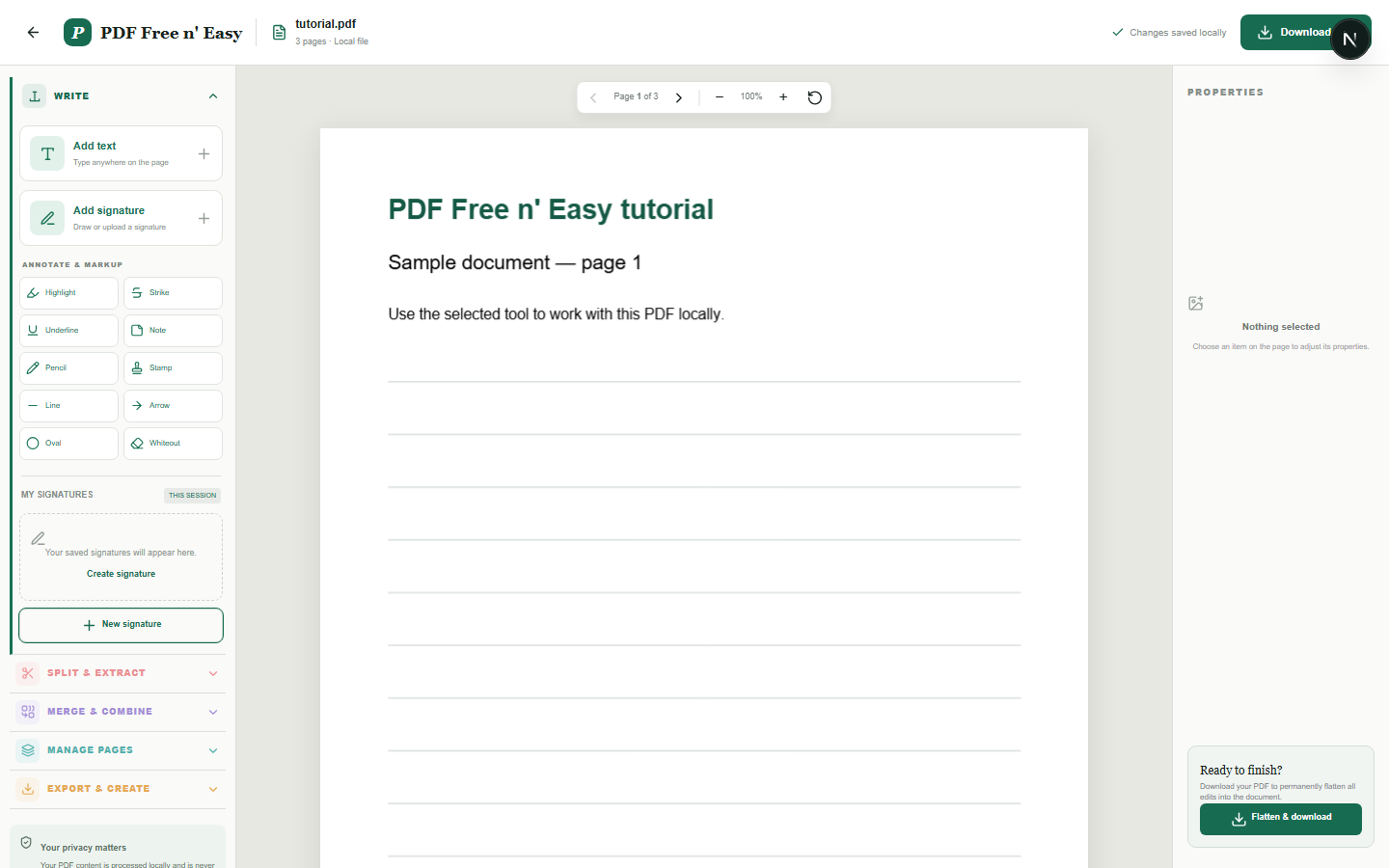
Finish the job on your device
- 1
Choose the PDF stored on your device.
- 2
Add and position text, signatures or annotations.
- 3
Flatten the changes and download a new PDF.
Clear expectations before you begin
- Original PDF content remains unchanged underneath added annotations.
- Your PDF content is processed locally in your browser and is never sent to us.
Your document stays yours
The editor reads and processes the PDF using code running in your browser. PDF content is not submitted to an application server for processing or storage.
Keep the working copy in your browser
Text, signatures and annotations are positioned against the PDF in browser memory. When you finish, your browser creates the flattened copy for download.
- 1SelectChoose a PDF directly from your device.
- 2ProcessThe supported operation runs in this browser tab.
- 3DownloadSave the newly generated result where you choose.
Edit a PDF privately in your browser FAQ
Can I change existing words in the PDF?
Not directly. This tool adds new text and annotations over the existing page. Use whiteout first when you need to cover old content.
Does editing reduce PDF quality?
Original pages are retained as PDF pages. Added elements are drawn into the exported copy rather than taking a screenshot of the entire document.